


In the digital world, financial fraudsters are becoming increasingly clever, but that doesn't mean you should be left unprotected. At Fast Shift, we believe that the best defense is giving you the power to personally manage and control your own account.
That's why we have introduced the transaction-blocking "Stop" button - a brand-new security mechanism that allows you to become the ultimate guardian of your wallet.
What is the "Stop" button?
The "Stop" button is a specialized fraud-prevention feature. It empowers Fast Shift app users to independently and instantly restrict the availability of financial services via remote access.
If you ever have doubts, want to stay safe from potential scams, or simply wish to limit access to your financial services for a while, this feature is built just for you.
How does it work?
Using this tool is incredibly simple and completely hassle-free:
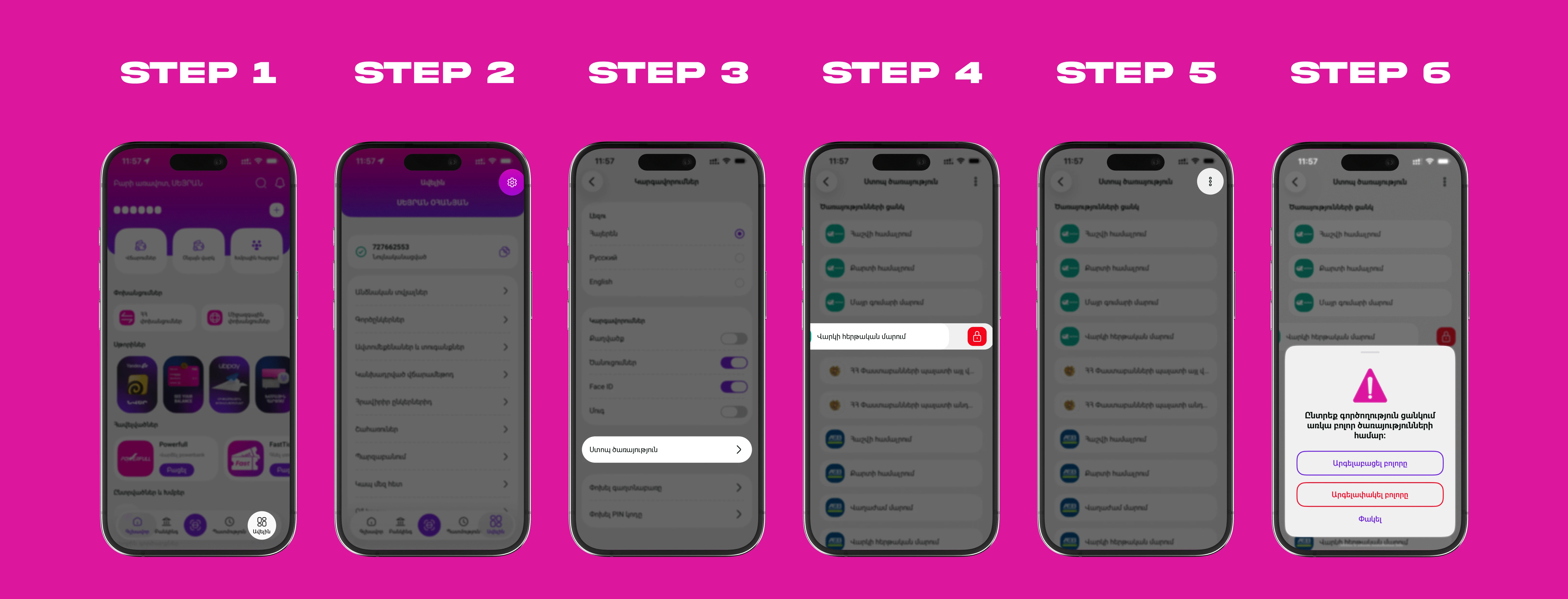
- Find the tool: Tap "More" in the bottom right corner of the app's home page, then go to "Settings" and look for the "Stop Service" button.
- Manage your services: Once you tap the "Stop Service" button, you will see a complete list of all remotely accessible services.
- Choose what to block: You can select the specific service or services you want to temporarily block.
- Complete "Stop": If needed, you can freeze all services at once with just a single tap.
- Biometric confirmation: To finalize blocking any, multiple, or all services, you just need to confirm the action using biometrics (Face ID or Fingerprint).
How to restore access to blocked services?
We’ve made sure that security doesn't come at the cost of your convenience. If everything is clear and you want to use the blocked services again, you can unblock them in two easy ways:
- By selecting the service(s) you wish to reactivate directly from the "Stop Service" section.
- By trying to use a blocked service and simply following the on-screen prompts.
Unblocking is confirmed using your biometrics (Face ID or Fingerprint) and takes just a few seconds. This guarantees that you are the one restoring access, keeping your account entirely safe from third parties.
Summary
Securing your finances doesn't have to be complicated. Thanks to the "Stop" button, you can freeze or reactivate your account's capabilities at any time, with just a single tap.
Head over to the "Settings" section in your app, check out the new feature, and enjoy the peace of mind that comes with knowing your finances are completely secure.